


myAudi
4.82.02K Reviews
App Specs
- Version
- 5.7.0
- Updated On
- License
- Free
- Downloads
- 1,000,000+
- Developer
- Audi
- Categories
- Auto & Vehicles
- Platform
- Android, iOS
Screenshots
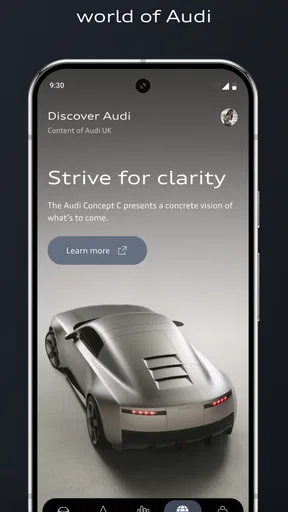
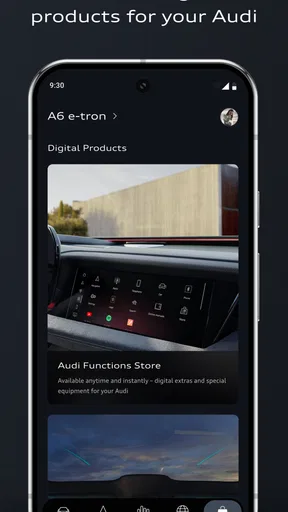
 Analysis by AppCompare
When I’m getting ready to drive, I want the useful details about my car to be easy to find, not scattered across a manual, a dashboard, and a trail of reminders. That is the appeal of myAudi: it gives Audi owners a phone-based place to manage connected services and check what their car can do. I find it most valuable when it supports a routine I already have, such as checking the car before leaving or preparing a destination in advance, rather than when I expect a phone app to replace every control in the vehicle.
Start with the car you actually own
Before you spend time setting up an account, it helps to have your Audi’s VIN number available and to think about what you want the app to handle. A quick status check, connected services, and trip preparation are different needs, and the features you can use depend on the vehicle and its equipment. That matters because two Audi owners can install the same app and see different possibilities.
The app is free to download, and Audi is the developer. It sits in the Auto & Vehicles category and is rated for Everyone. Its current version is 5.5.0, and it requires Android 12 or later on Android devices. Those details make it easy to judge whether it fits your phone before you begin; they do not tell you which connected functions are available for your particular car, so the model-specific setup is still important.
First things first, downloading the myAudi app is a breeze. Just head over to your app store, search for it, and hit download. Once installed, setting it up is pretty straightforward. You’ll need your Audi’s VIN number handy, so you might want to snap a pic of it before you start.
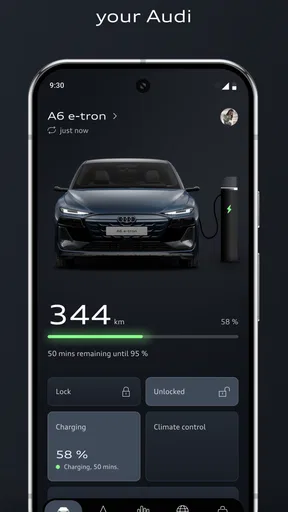
The app’s interface is clean and modern, making navigation easy even for those who aren’t tech-savvy. After setting up, you’re greeted with a dashboard that’s packed with features tailored to your specific Audi model. From here, you can dive into the real power of the app.
Make setup useful, not just complete
I’d treat the first session as a practical check rather than a tour of every menu. Add the vehicle, then look for the functions that match your everyday routine. If you mainly want reassurance that the car is secure, begin with vehicle status and remote access where available. If you travel often, check whether route planning and navigation handoff are relevant to your setup. This small amount of prioritizing makes the app feel less like another account to maintain.
It is also sensible to confirm what your Audi supports before relying on a connected feature. Vehicle age, model, equipment, and the services associated with the car can all affect what appears. I would not assume that a function described by another owner will be available on every Audi. If a particular option is missing, check the vehicle’s own connected-service information rather than repeatedly reinstalling the app or changing phone settings.
Worth Reading Before You Choose

Baby Panda World Brings Quick Play to Modern Phones, but Its Game Library Feels Busy

ESPN’s Live Game View Makes Following Close Games Easier

QuizzLand Review: A Good Fit for Short Trivia Breaks, Not Every Player

Basketball Stars: Multiplayer Is Fast, but Can It Recover When Matches Go Wrong?

WEBTOON Turns Phone Updates Into a Better Reading Routine

Link to Windows Runs on Shared Habits, Not Social Feeds
From a quick check to a prepared drive
I use the move from an initial vehicle check to a ready-to-drive routine as the guide here: the key is choosing one task myAudi can make easier, then seeing how smoothly it passes from phone to car. I also look at what needs to be checked before relying on that routine, so the next section can focus on the practical steps rather than treating setup as a box-ticking exercise.
Features That Stand Out
One of the most impressive features I found is the remote lock and unlock capability. Ever walked away from your car and couldn’t remember if you locked it? With the app, you can lock or unlock your car from anywhere. It’s a real lifesaver for the forgetful among us.
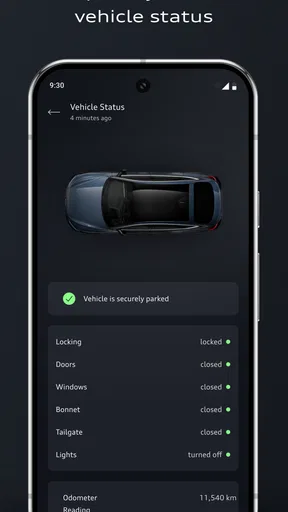
Another handy tool is the vehicle status report. It gives you a snapshot of your car’s health, including fuel level, mileage, and even the status of your windows and doors. It’s like having a mechanic in your pocket!
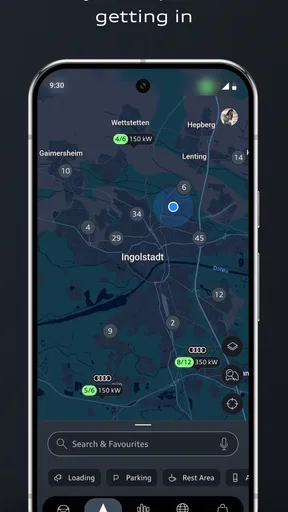
For those who love to plan their journeys, the app offers a route planner that syncs with your car’s navigation system. You can plan your trip on the app, and it will automatically send the directions to your car’s nav. Super convenient, right?
A realistic routine, with useful handoffs
Imagine you are leaving work, heading to an unfamiliar address, and cannot remember whether you closed the car windows. A sensible sequence is to check the vehicle status first, use remote access if the car and service support it, and then prepare the destination in the app before you reach the vehicle. When the route transfers to the car’s navigation system, the phone has done the planning and the car takes over for the drive. That division of labor is where the app can save time: it helps with preparation, while the in-car system remains the place to follow directions.
For a more ordinary errand, I’d use the status screen as a quick pre-departure check rather than repeatedly opening it throughout the day. Looking at the fuel level and door or window state together can answer several small questions in one visit. It is a modest convenience, but those checks are exactly the sort of task that can make a manufacturer’s app worthwhile when they are reliable and easy to reach.
There is a useful trade-off here. A route planned on a larger phone screen can be easier to adjust before setting off, but the handoff depends on the car’s compatible navigation and connected setup. If you normally rely on a separate phone navigation app, that may remain the simpler choice for a quick one-off trip. I would plan routes in myAudi when I specifically want the destination to continue in the Audi’s own navigation, not just because route planning exists.
Integration and Connectivity
The app is designed to integrate seamlessly with your Audi’s onboard systems. It connects via Bluetooth or the internet, ensuring you’re always in the loop. Plus, if you have an Audi with Audi Connect, the integration is even deeper, offering features like traffic updates and Google Earth navigation.
One thing to note is that some features require a subscription to Audi Connect, so it’s worth checking what’s included with your car model before diving in.
This is the point where expectations matter most. The app is not a universal remote for every Audi, and installing it alone does not guarantee that every connected service will work. Some functions depend on the vehicle’s equipment or an Audi Connect subscription. Before building a routine around remote access or navigation handoff, I’d check the options shown for the car and confirm any service requirements. That avoids the frustrating discovery that a feature you planned to use is not part of your setup.
Where it fits beside other driving apps
Compared with general navigation apps, myAudi’s strongest reason to exist is its connection to an Audi vehicle: checking car status, using supported remote functions, and handing a planned route to the onboard navigation. A general map app may be more convenient if you drive several makes of car, want the same interface in every vehicle, or simply need directions without pairing them with a specific Audi. I would keep both approaches in mind instead of expecting one app to win every driving task.
Likewise, the car’s own controls remain the straightforward option when you are already sitting inside it. The phone app is most useful before a journey or after walking away, when checking a status or preparing a destination saves a step. It is less compelling for drivers who rarely use connected services, prefer not to manage another account, or have an Audi whose equipment offers little of the functionality they want.
Security and Peace of Mind
Security is a big deal when it comes to connected devices, and the app doesn’t disappoint. It’s equipped with several layers of security to protect your data. Plus, if your car is ever stolen, the app can help locate it, giving you some much-needed peace of mind.
I’d still use the app as one part of sensible vehicle security, not as a substitute for the usual precautions. Remote functions and location-related services are useful only when the car supports them and the relevant connected service is active. If you are dealing with an urgent security problem, use the appropriate local or Audi support channels as well; a phone app should not be your only plan.
Room for Improvement
While the app is packed with features, it does have a couple of areas that could use a bit of polish. For instance, the initial setup process, while straightforward, can be a bit tedious with all the details you need to input. Also, some users have reported occasional connectivity issues, which can be frustrating if you’re trying to access your vehicle remotely.
Another point to consider is that full functionality is often limited to newer Audi models. So, if you’re driving an older model, you might not get the full suite of features.
Connectivity is a practical limitation, not just a technical footnote. If a remote check does not load when you are standing away from the car, it is better to treat that as a reason to verify directly when possible, rather than assume the last displayed status is current. I would avoid making a time-sensitive decision based only on an app screen that has not refreshed. Keeping expectations modest makes the app more helpful: use it for convenience, but let the physical car and its controls settle anything that needs immediate certainty.
The app has a 3.7 average from around 87,000 ratings, with roughly 1.9 thousand written reviews, and it has been installed over a million times. That gives a useful sense of its reach, but ratings cannot predict how well it will fit a particular Audi or service setup. In my view, the most relevant test is whether the functions for your own car work consistently enough to become part of your routine.
Who will get the most from it
I’d recommend trying myAudi if you own a compatible Audi and expect to use connected vehicle information, remote access, or destination planning. It is especially suited to someone who likes to check a car before leaving, wants a route ready when they get in, or has a regular parking routine where confirming the vehicle’s state is reassuring. The app’s value grows when those tasks happen often; a feature used every week is more meaningful than a long menu of options opened once.
On the other hand, it may not be worth making central to your driving if you use a basic phone map, rarely need vehicle status, or own an older model with limited connected functions. Drivers who want a single app that works in any make of car will usually be better served by a general navigation tool for directions. I would also skip relying on remote actions until I had confirmed that my vehicle supports them and tested the connection in a low-pressure situation.
Final Thoughts
All in all, the myAudi app is a fantastic companion for any Audi owner. It offers a blend of convenience, security, and connectivity that makes managing your car a breeze. Whether you’re planning a road trip or just need to check if you locked your car, this app has got your back.
So, if you haven’t already, give the myAudi app a try and see how it transforms your driving experience. It’s like having a co-pilot right on your smartphone!
My practical advice is to start with one job you genuinely want the app to do, then see whether your car supports it and whether the connection behaves reliably. If that first routine—checking status, using an available remote function, or sending a destination to the car—fits naturally into your day, the app earns its place on your phone. If it does not, a standard navigation app and the car’s own controls may be all you need.
Pros
- Intuitive user interface design.
- Real-time vehicle status updates.
- Seamless integration with Audi services.
- Remote climate control feature.
- Customizable notifications for maintenance.
Cons
- Limited functionality without premium features.
- Occasional connectivity issues reported.
- App size is relatively large.
- Requires frequent updates for optimal use.
- Some features vary by vehicle model.
FAQs for myAudi
What features does the myAudi app offer?
The myAudi app serves as a comprehensive digital companion for Audi owners. It offers features such as remote locking and unlocking, vehicle status monitoring, and route planning. Users can also access their Audi's digital service schedule, manage maintenance appointments, and receive real-time vehicle alerts. The app enhances the driving experience by integrating seamlessly with Audi's in-car systems.
Is the myAudi app compatible with all Audi models?
The myAudi app is compatible with most newer Audi models equipped with the necessary digital infrastructure. However, compatibility may vary depending on the specific model and year. Users should verify compatibility by checking Audi's official website or consulting their vehicle's documentation to ensure all app features are supported by their specific model.
How secure is the myAudi app in terms of personal data and vehicle security?
Audi prioritizes user security and privacy. The myAudi app employs robust encryption methods to protect personal data and vehicle information. Users can set up multi-factor authentication for an added layer of security. Audi's privacy policy outlines how data is handled and stored, ensuring users have control over their personal information.
Can the myAudi app be used to locate my vehicle?
Yes, the myAudi app includes a 'Find My Car' feature that allows users to locate their Audi easily. This feature is particularly useful in large parking areas or unfamiliar locations. It uses GPS technology to pinpoint the vehicle's location, and users can receive directions to reach it via the app, enhancing convenience and peace of mind.
Are there any subscription fees associated with the myAudi app?
The myAudi app itself is free to download and use, but some features may require a subscription or additional package. For instance, advanced services like Audi Connect may incur extra charges. It's advisable to review the app's terms and conditions or contact Audi customer support for detailed information on potential costs.


